StoryStack: Qt-based Dialogue Creator
Personal Project | C++ & Qt | PC | Solo| In Progress
StoryStack explores using a vertical alternative for dialogue, instead of the usual node-based approach.
It aims to provide designers with a clean, logical overview of complex branching narratives without the visual clutter of traditional node-based graphs.
Table of Contents
-
Implementation Highlights
Video Showcase

The current build uses the C++ API, saves to JSON and creates a linear based dialogue. Names can be added to a list of characters, which can then be used to create dialogue for. The red block is of type "Dialogue", which is the starting type of every conversation.

The current UX design for StoryStack's nested branching hierarchy.

A show case of the saved data: This is how the data is currently saved. Characters are global, since they can be used in multiple scenes later on. And each entry in the dialogue array has the line created, a line id for the line , and a reference to the ID of the speaker of this line (so the speaker can be easily swapped out for another, if necessary).
Dialogue order is also saved, this will be used to determine the flow of dialogue. Later if users wish to change dialogue order it will only happen in one place and the dialogue itself is not affected.
Design
For the UI I made several mockups to explore how I could show dialogue and what the user interactions would be.
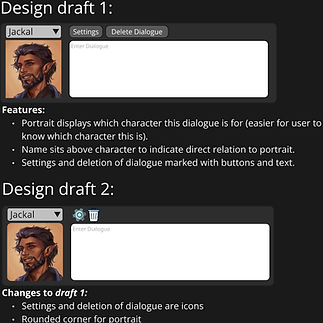
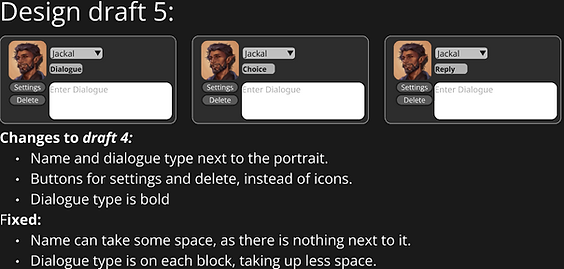
I like to just put something down first and then see where I can fix any issues and ask myself questions (e.g., what would happen if a character has a very long name, how can I save space, how do I make sure that different dialogue types are displayed clearly, etc. ).

The final UI that I went with (Draft 6) balances the UI well for what I wanted initially. You can see the character portrait, name, dialogue type and settings are clearly shown It stays small and simple. For each dialogue type you can make other dialogue types.
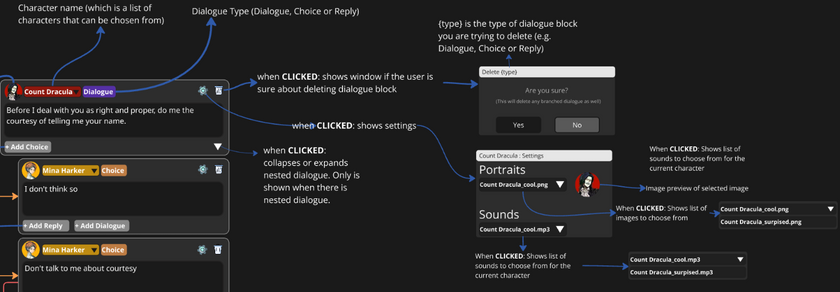
For user interactions I set-up what happens when you click on certain UI elements or the behaviour that would happen. E.g., What does the window for settings look like, when can you collapse nested dialogue.

Implementation Highlights
Custom C++ API
I built the core as a standalone C++ library. I chose to use free functions rather than a object-oriented setup because I only want to manage data. It keeps the code simple. The user can create scenes, characters, dialogue , and swap lines or speakers. It also makes it easier to plug into different game engines later on.
Dialogue API header
Dialogue API source
Example of using the API to create dialogue for characters
Data Serialization & UUIDs
For StoryStack I use JSON for serialization. Its easy to parse across any engine and remains fairly human readable.
To manage the narrative logic, every entry is assigned a UUID. This ensures that I can support team collaboration (eliminating ID collision during merges, working together in a scene) and that links between dialogues never break, even when characters/scenes are renamed or dialogue order is reordered.

Design of JSON output
-
Characters are globally stored, since they can be used in multiple scenes. And if something changes with the characters, the places where the character is referenced do not all need to be updated.
-
Dialogue: all the dialogue is stored in an array within a scene. Each dialogue entry has the id for the line, the character who speaks the line (which is a reference to the global character ID), the dialogue type and the dialogue itself.
-
Dialogue Order: The order of dialogue is stored separate. This way the internal dialogue array doesn’t need to be changed in any way. This is useful when users would want to change the order of dialogue in the tool.
MVC Model (Model-View-Controller)
The application is separated into the Model(C++ library), the View(all the UI elements and windows in QT Creator), and the Controller(The link between the Model and the View). To communicate between the View(s) and Controller, I use signals and slots.
The MVC model allows me to write my core dialogue logic separated from the UI, which means that the library itself is usable in any game engine, or another application that is used to create UI.

The initial UML draft of the MVC model for my application. Using signals between the Views and the Controller to create dialogue, create new characters, or save the data.
Example of MVC: The Controller sits between the Qt UI and the C++ library. When the UI requests an action (saving dialogue, adding dialogue, or creating a character), the controller calls the library to handle the data, then emits a signal so the UI can update accordingly.
Changelog
Week 45 - 2025
UI:
-
Updated Dialogue Creation Window:
-
Opening the Character Creation window is now done in this window (instead of Dialogue Area)
-
Create dialogue blocks, by choosing a character name, the dialogue type ("Dialogue" for now only), and typing in the dialogue (Result: current application overview)
-
Week 42 - 2025
Design:
-
Created visual breakdown of Signal and Slot flow between Views and Controller
-
Create New UML for UI windows and elements, which includes the signal and slot flow
UI:
-
Added Dialogue Creation Window in QT. ( separate window for creating dialogue blocks more easily)
- Updated Character Creation window to emit a signal when a character is created
- Connected UI signals/slots for dialogue creation and saving
Backend:
-
Added Controller and implement slots/signals for:
-
Saving dialogue
-
Creating dialogue
-
Creating characters
-
Week 40 - 2025
Design:
-
Designed UML based on MVC model on Miro
Library:
-
Created and implemented new API for C++ library
Week 38 - 2025
Library:
-
Implemented technical design in the C++ Library
-
Created static DialogueManager class
-
Added functions to add character, get character names, create scene, and create dialogue entry
-
-
Implemented JSON data saving
-
Created functionality to save scenes, dialogue, dialogue order, and characters to JSON
-
UI:
-
Used C++ functions in QT Creator
-
Add Dialogue button also creates a dialogue entry in data
-
Creating a new name in the Character Creation Window, also creates said character in data
-
-
Add Character button in Dialogue Area opens the Character Creation window
Design:
-
Updated design for the dialogue blocks and the User UI flow of the application
Week 37 - 2025
Design:
-
Planned out technical design for the JSON data and C++ Library on Miro
Library:
-
Setup UUID library(https://github.com/crashoz/uuid_v4)
Week 36 - 2025
Design:
-
Created initial dialogue design in Miro
UI:
-
Created the Dialogue Area window:
-
Added Add Dialogue button for inserting a new dialogue container to a scrollable list
-
Added Add Character button to open the Character Creation window
-
Will be the central window for dialogue
-
-
Created the Dialogue Container UI element:
-
Added dropdown (will later display character list)
-
Added text field (will later be used to capture dialogue)
-
Will be used for displaying dialogue
-
-
Created the Character Creation window
-
Added text field (will later be used to create new character names)
-
Added Confirm and Cancel buttons
-
Will be used for creating new character names
-


